<?xml version="1.0" encoding="utf-8"?>
<feed xmlns="http://www.w3.org/2005/Atom">
    <title>Adventures in Movable Type</title>
    <link rel="alternate" type="text/html" href="http://www.beausmith.com/mt/" />
    <link rel="self" type="application/atom+xml" href="http://www.beausmith.com/mt/atom.xml" />
    <id>tag:www.beausmith.com,2008-09-17:/mt//2</id>
    <updated>2009-12-22T21:00:42Z</updated>
    <subtitle>idea &#8594; reqs &#8594; specs &#8594; comps &#8594; wires &#8594; code &#8594; qa... ship it.</subtitle>
    <generator uri="http://www.sixapart.com/movabletype/">Movable Type Pro 4.32-en</generator>

<entry>
    <title>Hack Movable Type app to order assets by asset label</title>
    <link rel="alternate" type="text/html" href="http://www.beausmith.com/mt/2009/12/hack-movable-type-app-to-order-assets-by-asset-label.php" />
    <id>tag:www.beausmith.com,2009:/mt//2.1076</id>

    <published>2009-12-21T22:17:24Z</published>
    <updated>2009-12-22T21:00:42Z</updated>

    <summary><![CDATA[Using MTML, you can sort assets by label in an entry context like this: &lt;mt:EntryAssets sort_by="label"&gt; &lt;!-- asset content here --&gt; &lt;/mt:EntryAssets&gt; However on the Edit Entry screen the filename for each asset is listed, but the assets are not...]]></summary>
    <author>
        <name>Beau Smith</name>
        <uri>http://beausmith.com</uri>
    </author>
    
        <category term="Hacks" scheme="http://www.sixapart.com/ns/types#category" />
    
    <category term="asset" label="asset" scheme="http://www.sixapart.com/ns/types#tag" />
    <category term="hack" label="hack" scheme="http://www.sixapart.com/ns/types#tag" />
    <category term="order" label="order" scheme="http://www.sixapart.com/ns/types#tag" />
    
    <content type="html" xml:lang="en" xml:base="http://www.beausmith.com/mt/">
        <![CDATA[<p>Using MTML, you can sort assets by label in an entry context like this:</p>

<pre><code>&lt;mt:EntryAssets sort_by="label"&gt;
    &lt;!-- asset content here --&gt;
&lt;/mt:EntryAssets&gt;
</code></pre>

<p>However on the Edit Entry screen the filename for each asset is listed, but the assets are not sorted by filename.</p>

<p>The following steps will update the Edit Entry/Page screen to list assets by asset label&#8230;</p>

<h2>Three App Templates to Edit</h2>

<p><strong><code>$MT_HOME/tmpl/cms/edit_entry.tmpl</code></strong></p>

<p>Update the template that produces the Edit Entry/Page screen.</p>

<ol>
<li><p>Line 491:</p>

<pre><code>&lt;mt:var name="asset_name"&gt;
</code></pre>

<p>Change to:</p>

<pre><code>&lt;mt:var name="asset_label"&gt; [&lt;mt:var name="asset_name"&gt;]
</code></pre></li>
</ol>

<p><strong><code>$MT_HOME/lib/MT/CMS/Entry.pm</code></strong></p>

<p>Update the script that collects the assets in the sidebar of the Edit Entry/Page screen.</p>

<ol>
<li><p>Line 191:</p>

<pre><code>$asset_1 = {asset_id =&gt; $asset-&gt;id, asset_name =&gt; $asset-&gt;file_name, asset_thumb =&gt; $asset-&gt;thumbnail_url(Width=&gt;100)};
</code></pre>

<p>Change to:</p>

<pre><code>$asset_1 = {asset_id =&gt; $asset-&gt;id, asset_name =&gt; $asset-&gt;file_name, asset_label =&gt; $asset-&gt;label, asset_thumb =&gt; $asset-&gt;thumbnail_url(Width=&gt;100)};
</code></pre></li>
<li><p>Line 193:</p>

<pre><code>$asset_1 = {asset_id =&gt; $asset-&gt;id, asset_name =&gt; $asset-&gt;file_name};
</code></pre>

<p>Change to:</p>

<pre><code>$asset_1 = {asset_id =&gt; $asset-&gt;id, asset_name =&gt; $asset-&gt;file_name, asset_label =&gt; $asset-&gt;label};
</code></pre></li>
<li><p>Line 201:</p>

<pre><code>my $asset_1 = {asset_id =&gt; $asset-&gt;id, asset_name =&gt; $asset-&gt;file_name};
</code></pre>

<p>Change to:</p>

<pre><code>my $asset_1 = {asset_id =&gt; $asset-&gt;id, asset_name =&gt; $asset-&gt;file_name, asset_label =&gt; $asset-&gt;label};
</code></pre></li>
<li><p>Line 210:</p>

<pre><code>$asset_1 = {asset_id =&gt; $asset-&gt;id, asset_name =&gt; $asset-&gt;file_name, asset_thumb =&gt; $asset-&gt;thumbnail_url(Width=&gt;100)};
</code></pre>

<p>Change to:</p>

<pre><code>$asset_1 = {asset_id =&gt; $asset-&gt;id, asset_name =&gt; $asset-&gt;file_name, asset_label =&gt; $asset-&gt;label, asset_thumb =&gt; $asset-&gt;thumbnail_url(Width=&gt;100)};
</code></pre></li>
<li><p>Line 212: </p>

<pre><code>$asset_1 = {asset_id =&gt; $asset-&gt;id, asset_name =&gt; $asset-&gt;file_name};
</code></pre>

<p>Change to:</p>

<pre><code>$asset_1 = {asset_id =&gt; $asset-&gt;id, asset_name =&gt; $asset-&gt;file_name, asset_label =&gt; $asset-&gt;label};
</code></pre></li>
<li><p>Line 217: This will sort assets by asset_label:</p>

<pre><code>$param-&gt;{asset_loop} = $assets;
</code></pre>

<p>Change to:</p>

<pre><code>$param-&gt;{asset_loop} = [ map $_-&gt;[1], sort { $a-&gt;[0] cmp $b-&gt;[0] } map { [ $_-&gt;{asset_label}, $_ ] } @$assets ];
</code></pre></li>
</ol>

<p><strong><code>$MT_HOME/tmpl/cms/dialog/asset_insert.tmpl</code></strong></p>

<p>Update the script that inserts the asset into the list of assets once selected.</p>

<ol>
<li><p>Line43</p>

<pre><code>myAssetLink.appendChild(document.createTextNode('&lt;mt:AssetLabel encode_js="1"&gt; [&lt;mt:AssetFileName encode_js="1"&gt;]'));
</code></pre>

<p>Change to:</p>

<pre><code>myAssetLink.appendChild(document.createTextNode('&lt;mt:AssetFileName encode_js="1"&gt;'));
</code></pre></li>
</ol>
]]>
        

    </content>
</entry>

<entry>
    <title>Hack Movable Type App to list pages by created date</title>
    <link rel="alternate" type="text/html" href="http://www.beausmith.com/mt/2009/12/hack-movable-type-app-to-list-pages-by-created-date.php" />
    <id>tag:www.beausmith.com,2009:/mt//2.1075</id>

    <published>2009-12-13T23:18:14Z</published>
    <updated>2009-12-14T21:30:16Z</updated>

    <summary><![CDATA[Without using a plugin, the best method for user-defined ordering of pages and entries is to sort by authored_on date. Entries: &lt;mt:Entries sort_by="authored_on"&gt; &lt;!-- entry content here --&gt; &lt;/mt:Entries&gt; Pages: &lt;mt:Pages sort_by="authored_on"&gt; &lt;!-- page content here --&gt; &lt;/mt:Pages&gt; The authored_on...]]></summary>
    <author>
        <name>Beau Smith</name>
        <uri>http://beausmith.com</uri>
    </author>
    
        <category term="Hacks" scheme="http://www.sixapart.com/ns/types#category" />
    
    <category term="hack" label="hack" scheme="http://www.sixapart.com/ns/types#tag" />
    
    <content type="html" xml:lang="en" xml:base="http://www.beausmith.com/mt/">
        <![CDATA[<p>Without using a plugin, the best method for user-defined ordering of pages and entries is to <a href="http://www.movabletype.org/documentation/appendices/tags/entries.html#sort_by">sort by <code>authored_on</code> date</a>.</p>

<p>Entries:</p>

<pre><code>&lt;mt:Entries sort_by="authored_on"&gt;
    &lt;!-- entry content here --&gt;
&lt;/mt:Entries&gt;
</code></pre>

<p>Pages:</p>

<pre><code>&lt;mt:Pages sort_by="authored_on"&gt;
    &lt;!-- page content here --&gt;
&lt;/mt:Pages&gt;
</code></pre>

<p>The <code>authored_on</code> date for entries can easily be updated using the &#8220;batch edit&#8221; functionality in the &#8220;More actions&#8230;&#8221; menu on the Manage Entries listing screen.</p>

<p>Because pages are listed by <code>modified_on</code> the &#8220;batch edit&#8221; functionality also uses the <code>modified_on</code> date. This is bad because the next time the page is saved, the modified date will be updated. (<a href="http://bugs.movabletype.org/default.asp?69523">I submitted a bug about this some time ago.</a>).</p>

<p>So follow along as we make a few changes to two Movable Type application templates to update Manage Pages screen (and the batch edit functionality for pages) use the <code>authored_on</code> date instead of the <code>modified_on</code> date.</p>

<blockquote>
  <p><strong>Note:</strong> We could just update the batch edit mode to use the <code>authored_on</code> date, but it would be more useful to update the Manage Pages screen to also use the <code>authored_on</code> date so that pages will be listed in the same order they will appear in the templates.</p>
</blockquote>

<p>These steps were tested in versions MT4.32 and MT4.261 but will work for all versions of MT4.x and MT5.0 as well.</p>

<blockquote>
  <p><strong>Tip:</strong> Always make a backup of a default file before modifying it; I duplicate the file and place a ~ after it:</p>

<pre><code>cp file.mtml file.mtml~
</code></pre>
</blockquote>

<h2>Two App Templates to Edit</h2>

<p><strong><code>$MT_HOME/tmpl/cms/include/entry_table.tmpl</code></strong></p>

<p>One change repacing the table header label:</p>

<ol>
<li><p>Search for (line 79):</p>

<pre><code>&lt;th class="date"&gt;&lt;mt:if name="object_type" eq="page"&gt;&lt;__trans phrase="Last Modified"&gt;&lt;mt:else&gt;&lt;__trans phrase="Created"&gt;&lt;/mt:if&gt;&lt;/th&gt;
</code></pre>

<p>Replace with:</p>

<pre><code>&lt;th class="date"&gt;&lt;__trans phrase="Created"&gt;&lt;/th&gt;
</code></pre></li>
</ol>

<p><strong><code>$MT_HOME/lib/MT/CMS/Entry.pm</code></strong></p>

<p>Three changes replacing <code>modified_on</code> with <code>authored_on</code> where conditioning based upon <code>$type eq 'page'</code>:</p>

<ol>
<li><p>Search for (line 547):</p>

<pre><code>$arg{'sort'} = $type eq 'page' ? 'modified_on' : 'authored_on';
</code></pre>

<p>Replace with:</p>

<pre><code>$arg{'sort'} = 'authored_on';
</code></pre></li>
<li><p>Search for (line 1726):</p>

<pre><code>$entry-&gt;modified_on($ts);
</code></pre>

<p>Replace with:</p>

<pre><code>$entry-&gt;authored_on($ts);
</code></pre></li>
<li><p>Search for (lines 1988 and 1989):</p>

<pre><code>if ( my $ts =
    ( $type eq 'page' ) ? $obj-&gt;modified_on : $obj-&gt;authored_on )
</code></pre>

<p>Replace with:</p>

<pre><code>if ( my $ts = $obj-&gt;authored_on )
</code></pre></li>
</ol>

<p>Once these edits have been made, login to Movable Type and view the Manage Pages screen. All pages will be listed by <code>created_on</code> date.</p>

<p>That&#8217;s it!</p>
]]>
        

    </content>
</entry>

<entry>
    <title>Edit Entry &amp; Page Links in Movable Type</title>
    <link rel="alternate" type="text/html" href="http://www.beausmith.com/mt/2009/11/edit-entry-and-page-links-in-movable-type.php" />
    <id>tag:www.beausmith.com,2009:/mt//2.1046</id>

    <published>2009-11-22T21:58:51Z</published>
    <updated>2009-11-22T22:11:51Z</updated>

    <summary>Previously, I wrote about how to add Edit Links to Entry and Page templates. This guide uses the mt_user cookie set when logging into Movable Type to condition content (links to screens in MT) on entries and pages published by...</summary>
    <author>
        <name>Beau Smith</name>
        <uri>http://beausmith.com</uri>
    </author>
    
        <category term="Hacks" scheme="http://www.sixapart.com/ns/types#category" />
    
        <category term="Tips &amp; Tricks" scheme="http://www.sixapart.com/ns/types#category" />
    
        <category term="code" scheme="http://www.sixapart.com/ns/types#category" />
    
        <category term="jQuery" scheme="http://www.sixapart.com/ns/types#category" />
    
    
    <content type="html" xml:lang="en" xml:base="http://www.beausmith.com/mt/">
        <![CDATA[<p>Previously, I wrote about how to <a href="/mt/2009/06/edit-links-for-entry-and-pages.php">add Edit Links to Entry and Page</a> templates.</p>

<p>This guide uses the <code>mt_user</code> cookie set when logging into Movable Type to condition content (links to screens in MT) on entries and pages published by Movable Type.</p>

<p>Also provides an option to use a non-MT cookie to do the same thing.</p>
]]>
        <![CDATA[<h2>Requirements</h2>

<ul>
<li>published pages are executed as <code>PHP</code>. Because of this if this code is to be used </li>
</ul>

<blockquote>
  <p><strong>Note:</strong> this same info can be adapted to create a purely javascript-based solution.</p>
</blockquote>

<h2>Adding Edit Entry and Edit Page Links</h2>

<ol>
<li><p>Update the config file (<code>mt-config.cgi</code>) with the <a href="http://movabletype.org/config/cookiepath">CookiePath</a> config directive:</p>

<pre><code>CookiePath /
</code></pre>

<blockquote>
  <p><strong>Note:</strong> If Movable Type is set up to publish to multiple domains then this won&#8217;t work for you</p>
</blockquote></li>
<li><p>Create a system level template module called &#8220;Global Config&#8221; and the following content:</p>

<pre><code>&lt;mt:Unless name="system_template"&gt;
    &lt;mt:SetVarTemplate name="edit_link"&gt;
        &lt;?php if (isset($_COOKIE["mt_user"])) {?&gt;
            [&lt;a class="edit-link" href="&lt;$mt:CGIPath$&gt;&lt;$mt:AdminScript$&gt;?__mode=view&amp;_type=&lt;mt:If name="entry_archive"&gt;entry&lt;mt:Else&gt;page&lt;/mt:If&gt;&amp;id=&lt;$mt:EntryID$&gt;&amp;blog_id=&lt;$mt:EntryBlogID$&gt;"&gt;Edit&lt;/a&gt;]
        &lt;?php } ?&gt;
    &lt;/mt:SetVarTemplate&gt;
&lt;/mt:Unless&gt;
</code></pre>

<blockquote>
  <p><strong>Note:</strong> The <a href="http://www.movabletype.org/documentation/designer/archive-template-variables.html">archive template variable</a> &#8220;<code>system_template</code>&#8221; is used to condition the links to only display on statically published files.</p>
</blockquote></li>
<li><p>Add the edit links to Movable Type templates.</p>

<p>For Entry and Page archive templates, just add this anywhere.</p>

<pre><code>&lt;$mt:Include module="Global Config"$&gt;
&lt;$mt:Var name="edit_link"$&gt;
</code></pre>

<p>For <code>&lt;mt:Entries&gt;</code> or <code>&lt;mt:Pages&gt;</code> loops in index or archive templates:</p>

<pre><code>&lt;$mt:Include module="Global Config"$&gt;
&lt;mt:Entries&gt;
    &lt;$mt:Var name="edit_link"$&gt;
    &lt;!-- other entry tags --&gt;
&lt;/mt:Entries&gt;
</code></pre>

<blockquote>
  <p><strong>Note:</strong> The include for the &#8220;Global Config&#8221; module only needs to be added once per template. I suggest placing it as the first line in the template.</p>
</blockquote></li>
<li><p>Republish all edited templates.</p></li>
<li>View your blog templates to see the cookie-conditioned code.</li>
</ol>

<h2>Links to other Movable Type App Pages</h2>

<p>To add links to:</p>

<ul>
<li>new entry</li>
<li>manage entries</li>
<li>manage templates</li>
<li><p>rebuild blog</p></li>
<li><p>Place this code on any page that you&#8217;d like to have links to:</p>

<pre><code>&lt;?php if (isset($_COOKIE["mt_user"])) {?&gt;
    &lt;div class="edit-links"&gt;
        (&lt;a href="&lt;$mt:AdminCGIPath$&gt;&lt;$mt:AdminScript$&gt;?__mode=view&amp;_type=entry&amp;blog_id=&lt;$mt:BlogID$&gt;"&gt;new&lt;/a&gt; /
        &lt;a href="&lt;$mt:AdminCGIPath$&gt;&lt;$mt:AdminScript$&gt;?__mode=list_entry&amp;blog_id=&lt;$mt:BlogID$&gt;"&gt;manage&lt;/a&gt;)
        &lt;a href="&lt;$mt:AdminCGIPath$&gt;&lt;$mt:AdminScript$&gt;?__mode=list&amp;_type=template&amp;blog_id=&lt;$mt:BlogID$&gt;"&gt;templates&lt;/a&gt;
        &lt;a onclick="doRebuild('7');return false;" title="Publish Site" href="javascript:void(0)"&gt;rebuild&lt;/a&gt;
        (&lt;$mt:BlogID$&gt;)
    &lt;/div&gt;
&lt;?php } ?&gt;
</code></pre></li>
<li><p>To use the rebuild add this to your Javascript index template in Movable Type:</p>

<pre><code>var CMSScriptURI = "&lt;$mt:AdminCGIPath$&gt;&lt;$mt:AdminScript$&gt;";
function doRebuild (blogID, otherParams) {
    window.open(CMSScriptURI + '?__mode=rebuild_confirm&amp;blog_id=' + blogID + '&amp;' + otherParams, 'rebuild_blog_' + blogID, 'width=400,height=400,resizable=yes');
}
</code></pre>

<p>If your javascript template is not published by Movable Type, then replace &#8220;<code>&lt;$mt:AdminCGIPath$&gt;&lt;$mt:AdminScript$&gt;</code>&#8221; with the path to the Movable Type application script &#8220;<code>http://www.your-domain.com/cgi-bin/mt/mt.cgi</code>&#8221;</p></li>
</ul>

<h2>Use a non-MT Cookie</h2>

<ol>
<li><p>Place this in your MTML template</p>

<pre><code>Entry edit links are &lt;strong&gt;&lt;?php echo (isset($_COOKIE["show_edit_links"]))? "on":"off" ?&gt;&lt;/strong&gt; &amp;nbsp; (&lt;a id="toggle-edit-links" href="/cheat-sheet/"&gt;turn &lt;?php echo (isset($_COOKIE["show_edit_links"]))? "off":"on" ?&gt;&lt;/a&gt;)
</code></pre></li>
<li>Add <a href="http://jquery.com/">jQuery</a></li>
<li>Add the <a href="http://plugins.jquery.com/project/cookie">&#8220;Cookie&#8221; jQuery plugin</a></li>
<li><p>Place jQuery javascript code in a jQuery-enabled js file.</p>

<pre><code>$('#toggle-edit-links').click( function () {
    var cookieName = "show_edit_links";
    if ($.cookie(cookieName))
        $.cookie(cookieName, null,   { expires: -1,  path: '/', domain: '.th.strangecode.com' })
    else
        $.cookie(cookieName, 'true', { expires: 365, path: '/', domain: '.th.strangecode.com' });
    // refresh window
    window.location = window.location;
})
</code></pre></li>
</ol>
]]>
    </content>
</entry>

<entry>
    <title>Advanced Breadcrumb Navigation</title>
    <link rel="alternate" type="text/html" href="http://www.beausmith.com/mt/2009/10/advanced-breadcrumb-navigation.php" />
    <id>tag:www.beausmith.com,2009:/mt//2.987</id>

    <published>2009-10-28T01:05:37Z</published>
    <updated>2009-10-28T01:11:34Z</updated>

    <summary>I needed a flexible system to append crumbs to an array&#8230; potentially remove items from the array, then output the array on the final template as a breadcrumb navigation. This was my solution using Movable Type template tags. I used...</summary>
    <author>
        <name>Beau Smith</name>
        <uri>http://beausmith.com</uri>
    </author>
    
        <category term="code" scheme="http://www.sixapart.com/ns/types#category" />
    
    <category term="array" label="array" scheme="http://www.sixapart.com/ns/types#tag" />
    <category term="breadcrumbs" label="breadcrumbs" scheme="http://www.sixapart.com/ns/types#tag" />
    <category term="function" label="function" scheme="http://www.sixapart.com/ns/types#tag" />
    <category term="loop" label="loop" scheme="http://www.sixapart.com/ns/types#tag" />
    <category term="navigation" label="navigation" scheme="http://www.sixapart.com/ns/types#tag" />
    <category term="var" label="var" scheme="http://www.sixapart.com/ns/types#tag" />
    <category term="variables" label="variables" scheme="http://www.sixapart.com/ns/types#tag" />
    
    <content type="html" xml:lang="en" xml:base="http://www.beausmith.com/mt/">
        <![CDATA[<p>I needed a flexible system to append crumbs to an array&#8230; potentially remove items from the array, then output the array on the final template as a breadcrumb navigation. This was my solution using Movable Type template tags.</p>

<p>I used the Var <a href="http://movabletype.org/tag/Var#function">function</a> attribute to push, shift, unshift items on an array variable and then used <a href="http://movabletype.org/tag/loop">mt:loop</a> to output the items in the array into a list of breadcrumbs. This was used in a Movable Type install with 20 blogs.</p>

<p>In a &#8220;global config&#8221; template module (included in the first line of every template) set the top level of the breadcrumbs:</p>

<pre><code>&lt;mt:SetVarBlock name="breadcrumbs" function="push"&gt;
    &lt;a href="&lt;$mt:BlogURL$&gt;"&gt;&lt;$mt:BlogName$&gt;&lt;/a&gt;
&lt;/mt:SetVarBlock&gt;
</code></pre>

<p>On an Entry archive template, add crumb to Category archive, Daily archive, and then add the Entry title:</p>

<pre><code>&lt;mt:IfArchiveTypeEnabled archive_type="Category"&gt;
    &lt;mt:If tag="EntryCategory"&gt;
        &lt;mt:SetVarBlock name="breadcrumbs" function="push"&gt;
            &lt;a href="&lt;$mt:EntryLink type="Category"$&gt;"&gt;&lt;$mt:EntryCategory$&gt;&lt;/a&gt;
        &lt;/mt:SetVarBlock&gt;
    &lt;/mt:If&gt;
&lt;/mt:IfArchiveTypeEnabled&gt;
&lt;mt:IfArchiveTypeEnabled archive_type="Daily"&gt;
    &lt;mt:SetVarBlock name="breadcrumbs" function="push"&gt;
    &lt;a href="&lt;$mt:EntryLink type="Daily"$&gt;"&gt;&lt;$mt:EntryDate format="%B %d, %Y"$&gt;&lt;/a&gt;
    &lt;/mt:SetVarBlock&gt;
&lt;/mt:IfArchiveTypeEnabled&gt;
&lt;mt:SetVarBlock name="breadcrumbs" function="push"&gt;
    &lt;$mt:EntryTitle$&gt;
&lt;/mt:SetVarBlock&gt;
</code></pre>

<p>On an Entry Listing archive template for a blog with Monthly archives enabled, add crumb for Archive Index page and for the current page.</p>

<pre><code>&lt;mt:IfArchiveTypeEnabled archive_type="Monthly"&gt;
    &lt;mt:SetVarBlock name="breadcrumbs" function="push"&gt;
        &lt;a href="&lt;$mt:Link template="archive_index"$&gt;"&gt;Archives&lt;/a&gt;
    &lt;/mt:SetVarBlock&gt;
&lt;/mt:IfArchiveTypeEnabled&gt;
&lt;mt:SetVarBlock name="breadcrumbs" function="push"&gt;
    &lt;$mt:ArchiveTitle$&gt;
&lt;/mt:SetVarBlock&gt;
</code></pre>

<p>In index templates (such as the Archive Index), add current page as the last crumb to the end of the array:</p>

<pre><code>&lt;mt:SetVarBlock name="breadcrumbs" function="push"&gt;
    Archives
&lt;/mt:SetVarBlock&gt;
</code></pre>

<p>To replace the first crumb if the BlogID is &#8220;1&#8221;, use the &#8220;shift&#8221; function to remove and the &#8220;unshift&#8221; function to prepend a crumb (I added this to a &#8220;blog config&#8221; template module which is included just after the &#8220;global config&#8221; template module in the first two lines of each template):</p>

<pre><code>&lt;mt:If tag="BlogID" eq="1"&gt;
    &lt;$mt:GetVar name="breadcrumbs" function="shift" setvar="removed_value"$&gt;
    &lt;mt:SetVarBlock name="breadcrumbs" function="unshift"&gt;
        &lt;a href="/foo/"&gt;Foo&lt;/a&gt;
    &lt;/mt:SetVarBlock&gt;
&lt;/mt:If&gt;
</code></pre>

<p>On the main index template for each blog I didn&#8217;t want to show breadcrumbs, so I&#8217;d set this boolean value:</p>

<pre><code>&lt;$mt:Var name="show_breadcrumbs" value="0"$&gt;
</code></pre>

<p>To output the crumbs, use the <a href="http://movabletype.org/tag/loop">mt:loop</a> tag:</p>

<pre><code>&lt;mt:If name="show_breadcrumbs"&gt;
&lt;div class="breadcrumbs"&gt;
    &lt;ol&gt;
    &lt;mt:Loop name="breadcrumbs"&gt;
        &lt;li&lt;mt:If name="__last__"&gt; class="last"&lt;/mt:If&gt;&gt;&lt;$mt:Var name="__value__" trim="1"$&gt;&lt;/li&gt;
    &lt;/mt:Loop&gt;
    &lt;/ol&gt;
&lt;/div&gt;
&lt;/mt:If&gt;
</code></pre>
]]>
        

    </content>
</entry>

<entry>
    <title>DebugMode for Published Templates using Configuration Directives</title>
    <link rel="alternate" type="text/html" href="http://www.beausmith.com/mt/2009/08/debugmode-for-published-templates-using-configuration-directives.php" />
    <id>tag:www.beausmith.com,2009:/mt//2.886</id>

    <published>2009-08-27T00:15:10Z</published>
    <updated>2009-08-27T00:45:24Z</updated>

    <summary>With large volumes of code&#8230; sometimes it&#8217;s useful to place comments in the code to document what the code does. In html, developers often use a html comment on a closing div tag to note which tag is being closed....</summary>
    <author>
        <name>Beau Smith</name>
        <uri>http://beausmith.com</uri>
    </author>
    
        <category term="Tips &amp; Tricks" scheme="http://www.sixapart.com/ns/types#category" />
    
    
    <content type="html" xml:lang="en" xml:base="http://www.beausmith.com/mt/">
        <![CDATA[<p>With large volumes of code&#8230; sometimes it&#8217;s useful to place comments in the code to document what the code does.</p>

<p>In html, developers often use a html comment on a closing div tag to note which tag is being closed.</p>

<pre><code>&lt;div id="main-content"&gt;
    ...many lines of code here...
&lt;/div&gt;&lt;!-- end of #main-content --&gt;
</code></pre>

<p>Once the page is being published in the production environment, these comments are no longer necessary and just add to the weight of the file.</p>

<p>There are many ways to condition these links in Movable Type:</p>

<ul>
<li><p>Create a <strong>Global Config</strong> template module and then set a variable in that template. Include this template module in all your templates and use the value to condition code.</p>

<p><em>Global Config</em> (use a value of 1 to show, 0 to hide)</p>

<pre><code>&lt;mt:Var name="display_coments" value="0"&gt;
</code></pre>

<p><em>Index Template</em></p>

<pre><code>&lt;$mt:Include module="Global Config"$&gt;
&lt;div id="main-content"&gt;
    ...many lines of code here...
&lt;/div&gt;
&lt;mt:If name="display_commnts"&gt;
    &lt;!-- end of #main-content --&gt;
&lt;/mt:If&gt;
</code></pre></li>
<li><p>Use <strong>configuration directives</strong> in your template. There are a bunch of useful <a href="http://www.movabletype.org/documentation/appendices/config-directives/">Configuration Directives</a> for Movable Type. Use the value of config directives in your templates as conditionals.</p>

<p>In the <em>mt-config.cgi</em> file add config directives:</p>

<pre><code># Config Directives
## Required
CGIPath /cgi-bin/branch-hanson/
Database mt_db
DBUser foo
DBPassword bar
DBHost localhost


## Optional
DebugMode 1  # See http://movabletype.org/config/DebugMode
FooBar 3     # Made up config directive
</code></pre>

<p>Use the <a href="http://movabletype.org/config/DebugMode"><code>DebugMode</code></a> config directive:</p>

<pre><code>&lt;mt:If name="config.DebugMode"&gt;
    &lt;!-- comment here --&gt;
&lt;/mt:If&gt;
</code></pre>

<p>Or make up your own and use the value such as <code>FooBar</code>:</p>

<pre><code>&lt;mt:If name="config.FooBar" eq="1"&gt;
    &lt;!-- condition 1 comment here --&gt;
&lt;mt:If name="config.FooBar" eq="2"&gt;
    &lt;!-- condition 2 comment here --&gt;
&lt;mt:Else&gt;
    &lt;!-- condition &lt;$mt:Var name="config.FooBar"$&gt; comment here --&gt;
&lt;/mt:If&gt;
</code></pre></li>
</ul>

<p>Hope either of these may be useful.</p>
]]>
        

    </content>
</entry>

<entry>
    <title>Heading Anchors via jQuery</title>
    <link rel="alternate" type="text/html" href="http://www.beausmith.com/mt/2009/07/heading-anchors-via-jquery.php" />
    <id>tag:www.beausmith.com,2009:/mt//2.835</id>

    <published>2009-07-17T18:34:06Z</published>
    <updated>2009-07-17T08:45:37Z</updated>

    <summary>Markdown is my text markup of choice&#8230; but one thing it doesn&#8217;t have is the ability to add classes or id elements to any of the html. Because what I wanted to do wasn&#8217;t critical without JavaScript enabled, I used...</summary>
    <author>
        <name>Beau Smith</name>
        <uri>http://beausmith.com</uri>
    </author>
    
        <category term="code" scheme="http://www.sixapart.com/ns/types#category" />
    
    <category term="javascript" label="javascript" scheme="http://www.sixapart.com/ns/types#tag" />
    <category term="jquery" label="jquery" scheme="http://www.sixapart.com/ns/types#tag" />
    <category term="markdown" label="markdown" scheme="http://www.sixapart.com/ns/types#tag" />
    <category term="menu" label="menu" scheme="http://www.sixapart.com/ns/types#tag" />
    <category term="navigation" label="navigation" scheme="http://www.sixapart.com/ns/types#tag" />
    
    <content type="html" xml:lang="en" xml:base="http://www.beausmith.com/mt/">
        <![CDATA[<p>Markdown is my text markup of choice&#8230; but one thing it doesn&#8217;t have is the ability to add classes or id elements to any of the html. Because what I wanted to do wasn&#8217;t critical without JavaScript enabled, I used jQuery to implement the same solution that the <a href="http://github.com/beausmith/mt-plugin-heading-anchors/">HeadingAnchors</a> plugin does&#8230; but in JavaScript. This also creates a navigation menu using all the H2 tag heading text.</p>

<h2>Code</h2>

<p>Requires <a href="http://www.beausmith.com/mt/2009/07/dirity-function-in-javascript.php">dirify function and dirify_table</a>.</p>

<pre><code>&lt;script type="text/javascript" src="http://www.google.com/jsapi"&gt;&lt;/script&gt;
&lt;script type="text/javascript"&gt;
    google.load("jquery", "1.3.2");

    // When the document is ready for javascript fun...
    google.setOnLoadCallback(function() {
        // initalize variable
        var $menu = '';
        // select all the page headings, assuming that h1 is only used once (for the main page title)
        $("h2, h3, h4, h5, h6").each(function () {
            // Dirity heading text to create the anchor
            $anchor = dirify($(this).text());
            // If heading is h2, add list item to menu
            if ("H2" == $(this)[0].nodeName) {
                $menu += '&lt;li&gt;&lt;a href="#' + $anchor + '"&gt;' + $(this).text() + '&lt;/a&gt;&lt;/li&gt;';
            };
            // Append anchor to heading
            $(this).append('&lt;a title="Link to this section" class="anchor" href="#' + $anchor + '"&gt; ¶&lt;/a&gt;').attr('id', $anchor);
        });
        // Add menu to sidebar
        $('.sidebar').prepend('&lt;div class="tag-menu"&gt;&lt;h3&gt;Tag Types&lt;/h3&gt;&lt;ul&gt;' + $menu + '&lt;/ul&gt;&lt;/div&gt;');
    });
&lt;/script&gt;
</code></pre>
]]>
        

    </content>
</entry>

<entry>
    <title>Dirify Function in Javascript</title>
    <link rel="alternate" type="text/html" href="http://www.beausmith.com/mt/2009/07/dirify-function-in-javascript.php" />
    <id>tag:www.beausmith.com,2009:/mt//2.834</id>

    <published>2009-07-17T17:38:06Z</published>
    <updated>2009-07-17T08:46:11Z</updated>

    <summary>Was messing around with JavaScript and jQuery and needed a dirify function&#8230; found one in the Movable Type core JavaScript file. Thought I&#8217;d post it here for the value of all vis-à-vis Google as the first results weren&#8217;t as useful...</summary>
    <author>
        <name>Beau Smith</name>
        <uri>http://beausmith.com</uri>
    </author>
    
        <category term="code" scheme="http://www.sixapart.com/ns/types#category" />
    
    <category term="dirify" label="dirify" scheme="http://www.sixapart.com/ns/types#tag" />
    <category term="javascript" label="javascript" scheme="http://www.sixapart.com/ns/types#tag" />
    
    <content type="html" xml:lang="en" xml:base="http://www.beausmith.com/mt/">
        <![CDATA[<p>Was messing around with JavaScript and jQuery and needed a dirify function&#8230; found one in the <a href="http://code.sixapart.com/svn/movabletype/trunk/mt-static/mt.js">Movable Type core JavaScript file</a>. Thought I&#8217;d post it here for the value of all vis-à-vis Google as the first results weren&#8217;t as useful as I hope this is.</p>

<p>And I added two features to the default code in MT:</p>

<ol>
<li><p>I like to use ampersands in my titles because they look spiffy, so I added ampersands to the <code>dirify_table</code> such that &#8220;&amp;&#8221; is now dirified to &#8220;and&#8221;.</p>

<pre><code>dirify("Me &amp; Ed's Pizza");
// result: me_and_eds_pizza
</code></pre></li>
<li><p>Sometimes you want dashes instead of underscores. This dirify function takes a second parameter that is the default separator.</p>

<pre><code>dirify("What the Duck?", "-");
// result: what-the-duck
</code></pre></li>
</ol>

<h2>Examples</h2>

<p>Place these examples in html <code>&lt;body&gt;</code>:</p>

<pre><code>&lt;script type="text/javascript"&gt;
var foo = "You &amp; Me";
var bar = dirify(foo);
document.write('"' + foo + '" dirified is "' + bar + '"');

document.write('&lt;br /&gt;');

// dirify on on one line
document.write(dirify("Me &amp; Ed's Pizza"));

document.write('&lt;br /&gt;');

// Use a dash
document.write(dirify("¿Is Open-Source is the bomb'd?", "-"));
&lt;/script&gt;
</code></pre>

<h2>Dirify Code</h2>

<p>Place the dirify function and the dirify_table in the <code>&lt;head&gt;</code> of the html page&#8230; or in the referenced JavaScript file:</p>

<pre><code>&lt;script type="text/javascript"&gt;
function dirify (s,d) {
    if (!d)
        d = "_";
    s = s.replace(/&lt;[^&gt;]+&gt;/g, '');
    for (var p in dirify_table)
        if (s.indexOf(p) != -1)
            s = s.replace(new RegExp(p, "g"), dirify_table[p]);
    s = s.toLowerCase();
    s = s.replace(/&amp;[^;\s]+;/g, '');
    s = s.replace(/[^-a-z0-9_ ]/g, '');
    s = s.replace(/\s+/g, '_');
    s = s.replace(/_+$/, '');
    s = s.replace(/_+/g, d);
    return s;
}
var dirify_table = {
    "\u0026": 'and',  // ampersand
    "\u00C0": 'A',    // A`
    "\u00E0": 'a',    // a`
    "\u00C1": 'A',    // A'
    "\u00E1": 'a',    // a'
    "\u00C2": 'A',    // A^
    "\u00E2": 'a',    // a^
    "\u0102": 'A',    // latin capital letter a with breve
    "\u0103": 'a',    // latin small letter a with breve
    "\u00C6": 'AE',   // latin capital letter AE
    "\u00E6": 'ae',   // latin small letter ae
    "\u00C5": 'A',    // latin capital letter a with ring above
    "\u00E5": 'a',    // latin small letter a with ring above
    "\u0100": 'A',    // latin capital letter a with macron
    "\u0101": 'a',    // latin small letter a with macron
    "\u0104": 'A',    // latin capital letter a with ogonek
    "\u0105": 'a',    // latin small letter a with ogonek
    "\u00C4": 'A',    // A:
    "\u00E4": 'a',    // a:
    "\u00C3": 'A',    // A~
    "\u00E3": 'a',    // a~
    "\u00C8": 'E',    // E`
    "\u00E8": 'e',    // e`
    "\u00C9": 'E',    // E'
    "\u00E9": 'e',    // e'
    "\u00CA": 'E',    // E^
    "\u00EA": 'e',    // e^
    "\u00CB": 'E',    // E:
    "\u00EB": 'e',    // e:
    "\u0112": 'E',    // latin capital letter e with macron
    "\u0113": 'e',    // latin small letter e with macron
    "\u0118": 'E',    // latin capital letter e with ogonek
    "\u0119": 'e',    // latin small letter e with ogonek
    "\u011A": 'E',    // latin capital letter e with caron
    "\u011B": 'e',    // latin small letter e with caron
    "\u0114": 'E',    // latin capital letter e with breve
    "\u0115": 'e',    // latin small letter e with breve
    "\u0116": 'E',    // latin capital letter e with dot above
    "\u0117": 'e',    // latin small letter e with dot above
    "\u00CC": 'I',    // I`
    "\u00EC": 'i',    // i`
    "\u00CD": 'I',    // I'
    "\u00ED": 'i',    // i'
    "\u00CE": 'I',    // I^
    "\u00EE": 'i',    // i^
    "\u00CF": 'I',    // I:
    "\u00EF": 'i',    // i:
    "\u012A": 'I',    // latin capital letter i with macron
    "\u012B": 'i',    // latin small letter i with macron
    "\u0128": 'I',    // latin capital letter i with tilde
    "\u0129": 'i',    // latin small letter i with tilde
    "\u012C": 'I',    // latin capital letter i with breve
    "\u012D": 'i',    // latin small letter i with breve
    "\u012E": 'I',    // latin capital letter i with ogonek
    "\u012F": 'i',    // latin small letter i with ogonek
    "\u0130": 'I',    // latin capital letter with dot above
    "\u0131": 'i',    // latin small letter dotless i
    "\u0132": 'IJ',   // latin capital ligature ij
    "\u0133": 'ij',   // latin small ligature ij
    "\u0134": 'J',    // latin capital letter j with circumflex
    "\u0135": 'j',    // latin small letter j with circumflex
    "\u0136": 'K',    // latin capital letter k with cedilla
    "\u0137": 'k',    // latin small letter k with cedilla
    "\u0138": 'k',    // latin small letter kra
    "\u0141": 'L',    // latin capital letter l with stroke
    "\u0142": 'l',    // latin small letter l with stroke
    "\u013D": 'L',    // latin capital letter l with caron
    "\u013E": 'l',    // latin small letter l with caron
    "\u0139": 'L',    // latin capital letter l with acute
    "\u013A": 'l',    // latin small letter l with acute
    "\u013B": 'L',    // latin capital letter l with cedilla
    "\u013C": 'l',    // latin small letter l with cedilla
    "\u013F": 'l',    // latin capital letter l with middle dot
    "\u0140": 'l',    // latin small letter l with middle dot
    "\u00D2": 'O',    // O`
    "\u00F2": 'o',    // o`
    "\u00D3": 'O',    // O'
    "\u00F3": 'o',    // o'
    "\u00D4": 'O',    // O^
    "\u00F4": 'o',    // o^
    "\u00D6": 'O',    // O:
    "\u00F6": 'o',    // o:
    "\u00D5": 'O',    // O~
    "\u00F5": 'o',    // o~
    "\u00D8": 'O',    // O/
    "\u00F8": 'o',    // o/
    "\u014C": 'O',    // latin capital letter o with macron
    "\u014D": 'o',    // latin small letter o with macron
    "\u0150": 'O',    // latin capital letter o with double acute
    "\u0151": 'o',    // latin small letter o with double acute
    "\u014E": 'O',    // latin capital letter o with breve
    "\u014F": 'o',    // latin small letter o with breve
    "\u0152": 'OE',   // latin capital ligature oe
    "\u0153": 'oe',   // latin small ligature oe
    "\u0154": 'R',    // latin capital letter r with acute
    "\u0155": 'r',    // latin small letter r with acute
    "\u0158": 'R',    // latin capital letter r with caron
    "\u0159": 'r',    // latin small letter r with caron
    "\u0156": 'R',    // latin capital letter r with cedilla
    "\u0157": 'r',    // latin small letter r with cedilla
    "\u00D9": 'U',    // U`
    "\u00F9": 'u',    // u`
    "\u00DA": 'U',    // U'
    "\u00FA": 'u',    // u'
    "\u00DB": 'U',    // U^
    "\u00FB": 'u',    // u^
    "\u00DC": 'U',    // U:
    "\u00FC": 'u',    // u:
    "\u016A": 'U',    // latin capital letter u with macron
    "\u016B": 'u',    // latin small letter u with macron
    "\u016E": 'U',    // latin capital letter u with ring above
    "\u016F": 'u',    // latin small letter u with ring above
    "\u0170": 'U',    // latin capital letter u with double acute
    "\u0171": 'u',    // latin small letter u with double acute
    "\u016C": 'U',    // latin capital letter u with breve
    "\u016D": 'u',    // latin small letter u with breve
    "\u0168": 'U',    // latin capital letter u with tilde
    "\u0169": 'u',    // latin small letter u with tilde
    "\u0172": 'U',    // latin capital letter u with ogonek
    "\u0173": 'u',    // latin small letter u with ogonek
    "\u00C7": 'C',    // ,C
    "\u00E7": 'c',    // ,c
    "\u0106": 'C',    // latin capital letter c with acute
    "\u0107": 'c',    // latin small letter c with acute
    "\u010C": 'C',    // latin capital letter c with caron
    "\u010D": 'c',    // latin small letter c with caron
    "\u0108": 'C',    // latin capital letter c with circumflex
    "\u0109": 'c',    // latin small letter c with circumflex
    "\u010A": 'C',    // latin capital letter c with dot above
    "\u010B": 'c',    // latin small letter c with dot above
    "\u010E": 'D',    // latin capital letter d with caron
    "\u010F": 'd',    // latin small letter d with caron
    "\u0110": 'D',    // latin capital letter d with stroke
    "\u0111": 'd',    // latin small letter d with stroke
    "\u00D1": 'N',    // N~
    "\u00F1": 'n',    // n~
    "\u0143": 'N',    // latin capital letter n with acute
    "\u0144": 'n',    // latin small letter n with acute
    "\u0147": 'N',    // latin capital letter n with caron
    "\u0148": 'n',    // latin small letter n with caron
    "\u0145": 'N',    // latin capital letter n with cedilla
    "\u0146": 'n',    // latin small letter n with cedilla
    "\u0149": 'n',    // latin small letter n preceded by apostrophe
    "\u014A": 'N',    // latin capital letter eng
    "\u014B": 'n',    // latin small letter eng
    "\u00DF": 'ss',   // double-s
    "\u015A": 'S',    // latin capital letter s with acute
    "\u015B": 's',    // latin small letter s with acute
    "\u0160": 'S',    // latin capital letter s with caron
    "\u0161": 's',    // latin small letter s with caron
    "\u015E": 'S',    // latin capital letter s with cedilla
    "\u015F": 's',    // latin small letter s with cedilla
    "\u015C": 'S',    // latin capital letter s with circumflex
    "\u015D": 's',    // latin small letter s with circumflex
    "\u0218": 'S',    // latin capital letter s with comma below
    "\u0219": 's',    // latin small letter s with comma below
    "\u0164": 'T',    // latin capital letter t with caron
    "\u0165": 't',    // latin small letter t with caron
    "\u0162": 'T',    // latin capital letter t with cedilla
    "\u0163": 't',    // latin small letter t with cedilla
    "\u0166": 'T',    // latin capital letter t with stroke
    "\u0167": 't',    // latin small letter t with stroke
    "\u021A": 'T',    // latin capital letter t with comma below
    "\u021B": 't',    // latin small letter t with comma below
    "\u0192": 'f',    // latin small letter f with hook
    "\u011C": 'G',    // latin capital letter g with circumflex
    "\u011D": 'g',    // latin small letter g with circumflex
    "\u011E": 'G',    // latin capital letter g with breve
    "\u011F": 'g',    // latin small letter g with breve
    "\u0120": 'G',    // latin capital letter g with dot above
    "\u0121": 'g',    // latin small letter g with dot above
    "\u0122": 'G',    // latin capital letter g with cedilla
    "\u0123": 'g',    // latin small letter g with cedilla
    "\u0124": 'H',    // latin capital letter h with circumflex
    "\u0125": 'h',    // latin small letter h with circumflex
    "\u0126": 'H',    // latin capital letter h with stroke
    "\u0127": 'h',    // latin small letter h with stroke
    "\u0174": 'W',    // latin capital letter w with circumflex
    "\u0175": 'w',    // latin small letter w with circumflex
    "\u00DD": 'Y',    // latin capital letter y with acute
    "\u00FD": 'y',    // latin small letter y with acute
    "\u0178": 'Y',    // latin capital letter y with diaeresis
    "\u00FF": 'y',    // latin small letter y with diaeresis
    "\u0176": 'Y',    // latin capital letter y with circumflex
    "\u0177": 'y',    // latin small letter y with circumflex
    "\u017D": 'Z',    // latin capital letter z with caron
    "\u017E": 'z',    // latin small letter z with caron
    "\u017B": 'Z',    // latin capital letter z with dot above
    "\u017C": 'z',    // latin small letter z with dot above
    "\u0179": 'Z',    // latin capital letter z with acute
    "\u017A": 'z'     // latin small letter z with acute
};
&lt;/script&gt;
</code></pre>
]]>
        

    </content>
</entry>

<entry>
    <title>Add Custom Styles for a Single Entry in Movable Type using PHP</title>
    <link rel="alternate" type="text/html" href="http://www.beausmith.com/mt/2009/07/add-custom-styles-for-a-single-entry-in-movable-type-using-php.php" />
    <id>tag:www.beausmith.com,2009:/mt//2.832</id>

    <published>2009-07-16T19:06:49Z</published>
    <updated>2009-07-16T19:22:54Z</updated>

    <summary>Stumbled across another way to Add Custom Styles for a Single Entry in Movable Type from the entry Individual Style on Khoi Vinh&#8217;s Subtraction.com. Create a css file using the same basename as your entry, but with a .css extension...</summary>
    <author>
        <name>Beau Smith</name>
        <uri>http://beausmith.com</uri>
    </author>
    
        <category term="Tips &amp; Tricks" scheme="http://www.sixapart.com/ns/types#category" />
    
    
    <content type="html" xml:lang="en" xml:base="http://www.beausmith.com/mt/">
        <![CDATA[<p>Stumbled across another way to <a href="/mt/2008/04/adding-custom-styles-for-a-single-entry-in-movable-type.php">Add Custom Styles for a Single Entry in Movable Type</a> from the entry <a href="http://www.subtraction.com/2005/01/14/individual-s">Individual Style</a> on Khoi Vinh&#8217;s <a href="http://www.subtraction.com/">Subtraction.com</a>.</p>

<ol>
<li>Create a css file using the same basename as your entry, but with a <code>.css</code> extension</li>
<li><p>Place this bit of PHP in the <code>&lt;head&gt;</code> element next to your other stylesheet links:</p>

<pre><code>&lt;?php
// check to see if a css file with the same name as the permalink exists,
// if so print a link to it
if (file_exists("&lt;$MTEntryPermalink$&gt;.css")) {
    print '&lt;link rel="stylesheet" type="text/css" href="&lt;$MTEntryPermalink$&gt;.css" /&gt;';
}
?&gt;
</code></pre></li>
</ol>

<p>This is great if there are many rules to add and/or if there is a need to edit the css independently from the publishing of the entry.</p>

<p>For just a few simple rules I&#8217;d still <a href="/mt/2008/04/adding-custom-styles-for-a-single-entry-in-movable-type.php">add the rules inline</a>. This has the benefit of keeping the styles directly associated to the content being styled.</p>
]]>
        

    </content>
</entry>

<entry>
    <title>Edit Links for Entry and Pages</title>
    <link rel="alternate" type="text/html" href="http://www.beausmith.com/mt/2009/06/edit-links-for-entry-and-pages.php" />
    <id>tag:www.beausmith.com,2009:/mt//2.788</id>

    <published>2009-06-24T06:36:25Z</published>
    <updated>2009-11-22T22:05:30Z</updated>

    <summary> Update: Advanced version using cookies to condition &#8220;edit&#8221; links Add an edit links to your Movable Type entries and pages....</summary>
    <author>
        <name>Beau Smith</name>
        <uri>http://beausmith.com</uri>
    </author>
    
        <category term="Tips &amp; Tricks" scheme="http://www.sixapart.com/ns/types#category" />
    
    <category term="edit" label="edit" scheme="http://www.sixapart.com/ns/types#tag" />
    <category term="tip" label="tip" scheme="http://www.sixapart.com/ns/types#tag" />
    <category term="trick" label="trick" scheme="http://www.sixapart.com/ns/types#tag" />
    
    <content type="html" xml:lang="en" xml:base="http://www.beausmith.com/mt/">
        <![CDATA[<blockquote>
  <p><strong>Update:</strong> <a href="/mt/2009/11/edit-entry-and-page-links-in-movable-type.php">Advanced version using cookies to condition &#8220;edit&#8221; links</a></p>
</blockquote>

<p>Add an edit links to your Movable Type entries and pages.</p>
]]>
        <![CDATA[<h2>Edit Entry</h2>

<pre><code>&lt;a href="&lt;$mt:CGIPath$&gt;&lt;$mt:AdminScript$&gt;?__mode=view&amp;_type=entry&amp;id=&lt;$mt:EntryID$&gt;&amp;blog_id=&lt;$mt:EntryBlogID$&gt;"&gt;Edit&lt;/a&gt;
</code></pre>

<h2>Edit Page</h2>

<pre><code>&lt;a href="&lt;$mt:CGIPath$&gt;&lt;$mt:AdminScript$&gt;?__mode=view&amp;_type=page&amp;id=&lt;$mt:EntryID$&gt;&amp;blog_id=&lt;$mt:EntryBlogID$&gt;"&gt;Edit&lt;/a&gt;
</code></pre>

<h2>Tips</h2>

<ul>
<li>Add <code>style="text-decoration: none"</code> to the anchor tag to ensure that there is no default link styling</li>
<li>Instead of the word &#8220;Edit&#8221; use an non-breaking space &#8220;<code>&amp;nbsp;</code>&#8221; and the link will be clickable but invisible</li>
</ul>
]]>
    </content>
</entry>

<entry>
    <title>Install Movable Type on a Mac</title>
    <link rel="alternate" type="text/html" href="http://www.beausmith.com/mt/2009/05/install-movable-type-on-a-mac.php" />
    <id>tag:www.beausmith.com,2009:/mt//2.695</id>

    <published>2009-05-21T01:46:40Z</published>
    <updated>2009-12-11T21:58:39Z</updated>

    <summary> ol li { list-style-type: decimal; } ol li li { list-style-type: upper-alpha; } ol li li li { list-style-type: upper-roman; } ol li li li li { list-style-type: lower-alpha; } This guide will take you through the steps to...</summary>
    <author>
        <name>Beau Smith</name>
        <uri>http://beausmith.com</uri>
    </author>
    
        <category term="Documentation" scheme="http://www.sixapart.com/ns/types#category" />
    
    <category term="apple" label="Apple" scheme="http://www.sixapart.com/ns/types#tag" />
    <category term="imagemagick" label="ImageMagick" scheme="http://www.sixapart.com/ns/types#tag" />
    <category term="install" label="install" scheme="http://www.sixapart.com/ns/types#tag" />
    <category term="mac" label="Mac" scheme="http://www.sixapart.com/ns/types#tag" />
    <category term="movabletype" label="Movable Type" scheme="http://www.sixapart.com/ns/types#tag" />
    <category term="mysql" label="MySQL" scheme="http://www.sixapart.com/ns/types#tag" />
    <category term="perl" label="Perl" scheme="http://www.sixapart.com/ns/types#tag" />
    <category term="php" label="PHP" scheme="http://www.sixapart.com/ns/types#tag" />
    <category term="software" label="software" scheme="http://www.sixapart.com/ns/types#tag" />
    
    <content type="html" xml:lang="en" xml:base="http://www.beausmith.com/mt/">
        <![CDATA[<p><style type="text/css">
ol li { list-style-type: decimal; }
ol li li { list-style-type: upper-alpha; }
ol li li li { list-style-type: upper-roman; }
ol li li li li { list-style-type: lower-alpha; }
</style></p>

<p>This guide will take you through the steps to install the necessary software to turn your Mac into a server with the required software to run Movable Type and then walk you though installing Movable Type.</p>

<p>You will need the following:</p>

<ul>
<li><strong>A Mac!</strong> - this installation was tested on a Mac Mini, an iMac, and a MacBook Pro both running Mac OS 10.5.5</li>
<li><strong>Administrator user account</strong> on the Mac</li>
<li><strong>Xcode Tools instaler</strong> on the Mac OS X Install DVD or available as a <a href="http://developer.apple.com/technology/Xcode.html">download from Apple.com</a></li>
<li><strong>internet connection</strong> &#8230;well I guess you have one if you&#8217;re reading this!</li>
<li><strong>Terminal.app</strong> - find this in your Utilities folder (from the Finder: Go > Utilities). You should be comfortable using the command line when proceeding with the following steps.</li>
</ul>

<p>We&#8217;ll first install the following server software:</p>

<ul>
<li>Xcode Tools</li>
<li>MySQL</li>
<li>PHP5</li>
<li>Perl modules:
<ul>
<li>DBD::mysql</li>
<li>Crypt::DSA</li>
<li>IPC::Run</li>
<li>Crypt::SSLeay</li>
<li>IO::Uncompress::Gunzip</li>
<li>IO::Compress::Gzip</li>
<li>Mail::Sendmail</li>
</ul></li>
<li>Image Magick and required image libraries:
<ul>
<li>LibJPEG</li>
<li>Libpng</li>
<li>Libiff</li>
</ul></li>
</ul>

<p>Then we&#8217;ll perform the steps specific to setting up a site and installing Movable Type:</p>

<ul>
<li>create a file structure for a site</li>
<li>create a default apache config</li>
<li>download Movable Type</li>
<li>create a MySQL database</li>
<li>configure Movable Type</li>
</ul>

<h2>Install Server Software</h2>

<p>Installing these 8 software libraries takes about 45 minutes. As I completed the step, I noted the <em>running time</em>.</p>

<ol>
<li><h3>Install Xcode Tools</h3>

<p>Double-click &#8220;XcodeTools&#8221; from the DVD that came with your mac.</p>

<p>Find it on the DVD in the following folder chain: Mac OS X Install DVD/ Optional Installs/ Xcode Tools/ XcodeTools</p>

<p><em>(running time: 8 min)</em></p></li>
<li><h3>Install MySQL</h3>

<ol>
<li>Go here: <a href="http://dev.mysql.com/downloads/mysql/5.1.html#macosx-dmg">http://dev.mysql.com/downloads/mysql/5.1.html#macosx-dmg</a></li>
<li><p>Download <strong>Mac OS X 10.5 (x86)</strong></p>

<p><strong><em>Note:</strong> After choosing a mirror, you are prompted to register. No need, click the link under the registration and sign in boxes: &#8220;No thanks, just take me to the downloads!&#8221;</em></p></li>
<li><p>Install (double-click) all the following items in the bundle:</p>

<ul>
<li>mysql-5.1.34-osx10.5-x86.pkg (or newer version)</li>
<li>MySQLStartupItem.pkg</li>
<li>MySQL.prefPane</li>
</ul></li>
<li><p>After installing <strong>MySQL.prefPane</strong>, the preference pane will be displayed. Click the <strong>Start MySQL Server</strong> button and be sure the checkbox for <strong>Automatically Start MySQL Server on Startup</strong> is checked.</p></li>
</ol>

<p><em>(running time: 12 min)</em></p></li>
<li><h3>Install PHP</h3>

<p>PHP 5.x is pre-installed in Mac OS 10.5.x. Edit the apache config:</p>

<pre><code>$ sudo vi /private/etc/apache2/httpd.conf
</code></pre>

<p>Remove the &#8220;#&#8221; from the beginning of this line to enable PHP:</p>

<pre><code>#LoadModule php5_module        libexec/apache2/libphp5.so
</code></pre>

<p><em>(running time: 14 min)</em></p></li>
<li><h3>Install Perl modules</h3>

<p>Install the below modules via Terminal app. Each may take a few minutes to install. If installation seems to stall but you get no errors, then assume all is going well. If necessary, go make a sandwich and come back a little while later.</p>

<p><strong>While installing, if prompted:</strong></p>

<ul>
<li>enter the admin user password when prompted: type the password and hit &#8220;return&#8221;.</li>
<li><strong>manual configuration</strong>: type &#8220;n&#8221; and hit &#8220;return&#8221; to use default configuration.</li>
<li><strong>optional modules</strong>: type &#8220;n&#8221; and hit &#8220;return&#8221; to not install these.</li>
<li><strong>mandatory modules</strong>: type &#8220;y&#8221; and hit &#8220;return&#8221; to install these.</li>
<li>select the default option when otherwise prompted: hit &#8220;return&#8221;.</li>
</ul>

<p>Install be below Perl modules one-by-one <em>(running time listed below)</em>:</p>

<pre><code>$ sudo cpan DBD::mysql
$ sudo cpan IPC::Run
$ sudo cpan Crypt::SSLeay
$ sudo cpan IO::Uncompress::Gunzip
$ sudo cpan IO::Compress::Gzip
$ sudo cpan Mail::Sendmail
$ sudo cpan Crypt::DSA
</code></pre>

<p>sudo cpan DBD::mysql <em>(running time: 15 min)</em><br />
sudo cpan IPC::Run <em>(running time: 16 min)</em><br />
sudo cpan Crypt::SSLeay <em>(running time: 17 min)</em><br />
sudo cpan IO::Uncompress::Gunzip <em>(running time: 18 min)</em><br />
sudo cpan IO::Compress::Gzip <em>(running time: 19 min)</em><br />
sudo cpan Mail::Sendmail <em>(running time: 20 min)</em><br />
sudo cpan Crypt::DSA <em>(running time: 22 min)</em><br /></p>

<p><em>We&#8217;ll check to ensure all these modules are installed correctly using the mt-check.cgi script after installing Movable Type.</em></p></li>
<li><h3>Install ImageMagick</h3>

<p>We&#8217;ll install three image libraries and then ImageMagic itself.</p>

<ol>
<li><h4>Create a temp directory</h4>

<p>This directory will be used for the downloaded software used in the following steps. Create it then change to that directory:</p>

<pre><code>$ mkdir ~/Desktop/mt_install;
$ cd ~/Desktop/mt_install;
</code></pre></li>
<li><h4>Install image libraries</h4>

<p>There are three prerequisite libraries for the version of ImageMagick we&#8217;ll be installing. </p>

<p><em>The below steps assume that you&#8217;re downloading files to the &#8220;Downloads&#8221; in the user&#8217;s home directory; modify the installation commands as necessary if your browser downloads the files to other locations.</em></p>

<ul>
<li><p><strong>Install LibJPEG</strong></p>

<ol>
<li>Download LibJPEG. Grab the most recent <code>tar.gz</code> file from <a href="http://www.ijg.org/">www.ijg.org</a></li>
<li><p>Issue the following commands (replacing the name of the <code>tar.gz</code> below with file name below &#8220;<code>jpegsrc.v6b.tar.gz</code>&#8221;):</p>

<pre><code>$ cd ~/Desktop/mt_install;
$ mv ~/Downloads/jpegsrc.v6b.tar.gz .;
$ tar xfv jpegsrc.v6b.tar.gz;
$ cd jpeg-6b;
$ ln -s `which glibtool` ./libtool
$ MACOSX_DEPLOYMENT_TARGET=10.5;
$ export MACOSX_DEPLOYMENT_TARGET;
$ ./configure --enable-shared;
$ make;
$ sudo mkdir /usr/local/include /usr/local/lib /usr/local/bin /usr/local/man /usr/local/man/man1;
$ sudo make install;
</code></pre>

<p><em>(running time: 25 min)</em></p></li>
</ol></li>
<li><p><strong>Install libpng</strong></p>

<ol>
<li>Go the the libpng site: <a href="http://www.libpng.org/pub/png/libpng.html">http://www.libpng.org/pub/png/libpng.html</a>.</li>
<li>Scroll to the &#8220;Source code&#8221; section and click the &#8220;.tar.gz&#8221; link under &#8220;with config script&#8221; heading.</li>
<li><p>Issue the following commands:</p>

<pre><code>$ cd ~/Desktop/mt_install;
$ mv ~/Downloads/libpng-1.2.35.tar.gz .;
$ tar xfv libpng-1.2.35.tar.gz
$ cd libpng-1.2.35;
$ ./configure --enable-shared;
$ make;
$ sudo make install;
</code></pre></li>
</ol>

<p><em>(running time: 29 min)</em></p></li>
<li><p><strong>Install libtiff</strong></p>

<ol>
<li>Download <code>tiff-3.8.2.tar.gz</code> from <a href="http://dl.maptools.org/dl/libtiff/">http://dl.maptools.org/dl/libtiff/</a> (which is the download mirror site of <a href="http://www.libtiff.org/">http://www.libtiff.org/</a>)</li>
<li><p>Issue the following commands:</p>

<pre><code>$ cd ~/Desktop/mt_install;
$ mv ~/Downloads/tiff-3.8.2.tar.gz .;
$ tar xfv tiff-3.8.2.tar.gz;
$ cd tiff-3.8.2;
$ ./configure --enable-shared;
$ make;
$ sudo make install;
</code></pre>

<p><em>(running time: 32 min)</em></p></li>
</ol></li>
</ul></li>
<li><h4>install ImageMagick</h4>

<ol>
<li><p>Download ImageMagic via FTP</p>

<pre><code>$ cd ~/Desktop/mt_install;
$ ftp ftp://ftp.imagemagick.org/pub/ImageMagick/ImageMagick.tar.gz
$ tar xfvz ImageMagick.tar.gz;
</code></pre></li>
<li><p>List the contents of the current directory to find the version of ImageMagick which was downloaded:</p>

<pre><code>$ ls
</code></pre></li>
<li><p>Change to the ImageMagick directory. If you downloaded <code>ImageMagick-6.5.2-2</code>, then continue with the steps below, otherwise the next line to contain the correct version number. (Note: the &#8220;make&#8221; command takes about 5-8 min to complete)</p>

<pre><code>$ cd ImageMagick-6.5.2-2;
$ LDFLAGS="-L/usr/local/lib" ./configure --with-jpeg=/usr/local/ --with-tiff=/usr/local --with-png=/usr/local;
$ make;
$ sudo make install;
</code></pre></li>
</ol>

<p><p><p><em>(running time: 43 min)</em></p></li>
</ol></p></li>
</ol></p>

<h2>Movable Type Specific Install</h2>

<ol>
<li><h3>Create the file structure for local website</h3>

<p>This command will set up the basic structure of the <code>_live</code> directory in the <code>~/Sites</code> directory as described below:</p>

<pre><code>$ mkdir ~/Sites/_live ~/Sites/_live/cgi ~/Sites/_live/docs ~/Sites/_live/html;
</code></pre>

<p>The below file structure is how I setup the sites I develop locally on my Mac. I&#8217;m never actively developing one site at a time so I have a single webroot which I move the active site into; <strong>site1.com</strong> is the currently active site. (I have a script that I use to switch sites in and out of the web root which I may post about at a later date.)</p>

<pre><code>~/Sites/
    _live/
        cgi/
            mt              &lt;-- symlink to current MT directory (created in a later step)
            MT-4.25-en/     &lt;-- MT app directory, aka $MT_HOME (created in a later step)
        docs/
            httpd.conf      &lt;-- custom apache config (created in a later step)
        html/               &lt;-- this will be the web-root
            mt-static/      &lt;-- symlink to dir in $MT_HOME (created in a later step)
            index.html       
    site1.com/              &lt;-- random site (currently disabled)
        docs/
            httpd.conf
        html/
            index.html
    site1.com/              &lt;-- site currently active in the _live directory
    site2.com/              &lt;-- random site (currently disabled)
        docs/
            httpd.conf
        html/
            index.html
</code></pre></li>
<li><h3>Configure the Apache web server</h3>

<ol>
<li><h4>Create the user apache configuration file (<code>~/etc/httpd/httpd.conf</code>) and directories:</h4>

<pre><code>$ mkdir ~/etc/ ~/etc/httpd/;
$ vi ~/etc/httpd/httpd.conf;
</code></pre></li>
<li><h4>Use the following code as the contents of the file, replacing &#8220;beau&#8221; and &#8220;sweetness&#8221; (name of my computer) with your own variables. (Set your computer&#8217;s name on the System Preferences -> Sharing Pane)</h4>

<pre><code>&lt;VirtualHost *:80&gt;
    ServerName sweetness.local
    ServerAlias *.sweetness.local
    ServerAlias localhost
    DocumentRoot /Users/beau/Sites/_live/html
    DirectoryIndex index.php index.html
    # Include custom apache configuration from live site directory.
    include /Users/beau/Sites/_live/docs/*httpd.conf
    &lt;Directory /Users/beau/Sites/_live&gt;
        Order allow,deny
        Allow from all
        AllowOverride All
        Options Indexes FollowSymLinks MultiViews
        AddHandler application/x-httpd-php .php .html
    &lt;/Directory&gt;
&lt;/VirtualHost&gt;
</code></pre>

<p><em>Not all of this config file is crucial, but it&#8217;s all useful!</em></p></li>
<li><h4>Alias the user apache config file into the directory which the main apache config includes other config files.</h4>

<p>In the Terminal app create a symlink using the following command (replace &#8220;beau&#8221; with your username)</p>

<pre><code>$ sudo ln -s ~/etc/httpd/httpd.conf /private/etc/apache2/other/beau.conf
</code></pre>

<p><em>The main apache config file (located here: <code>/private/etc/apache2/httpd.conf</code>) contains the line <code>Include /private/etc/apache2/other/*.conf</code> which will include all file ending in &#8220;.conf&#8221; which are placed in the <code>/private/etc/apache2/other/</code> directory.</em></p></li>
<li><h4>Create site apache config file</h4>

<p>Create the file:</p>

<pre><code>$ vi ~/Sites/_live/docs/httpd.conf
</code></pre>

<p>Add the following content:</p>

<pre><code>ScriptAlias /cgi/ /Users/beau/Sites/_live/cgi/
Alias /mt-static/ /Users/beau/Sites/_live/cgi/mt/mt-static/
AllowEncodedSlashes On  # required for MTConnect plugin
&lt;Directory "/Users/beau/Sites/_live/cgi"&gt;
    AllowOverride All
    Options None
    Order allow,deny
    Allow from all
    Options FollowSymLinks
&lt;/Directory&gt;
&lt;Directory "/Users/beau/Sites/_live/html"&gt;
    AllowOverride All
    Options +Indexes
    Order allow,deny
    Allow from all
    Options FollowSymLinks
&lt;/Directory&gt;
SetEnv MAGICK_HOME /usr/local/ImageMagick-6.4.0
SetEnv DYLD_LIBRARY_PATH /usr/local/ImageMagick-6.4.0/lib
</code></pre></li>
<li><h4>Restart Apache</h4>

<pre><code>$ sudo apachectl graceful
</code></pre>

<p><em>This is the same as unchecking and then checking the &#8220;Web Sharing&#8221; checkbox in the <strong>System Preferences -> Sharing</strong> preference pane</em></p></li>
</ol></li>
<li><h3>Download Movable Type</h3>

<p><em>Filenames may be different if using different version of Movable Type.</em></p>

<ol>
<li><h4>Download</h4>

<p><a href="http://www.movabletype.com/downloads/download.php">http://www.movabletype.com/downloads/download.php</a></p></li>
<li><h4>Uncompress the downloaded file</h4>

<pre><code>$ unzip ~/Downloads/MT-4.25-en.zip
</code></pre></li>
<li><h4>Move MT to the live directory&#8217;s cgi folder</h4>

<pre><code>$ mv ~/Downloads/MT-4.25-en ~/Sites/_live/cgi/
</code></pre></li>
<li><h4>Create symlink aliasing <code>mt</code> to the current version of MT.</h4>

<pre><code>$ ln -s ~/Sites/_live/cgi/MT-4.25-en ~/Sites/_live/cgi/mt
</code></pre>

<p><strong><em>Note:</strong> This step will ease future upgrades. When upgrading in the future, use a modified version of this code to remove the symlink then replace it with a symlink to the new version:</em></p>

<pre><code>$ rm ~/Sites/_live/cgi/mt; ln -s ~/Sites/_live/cgi/NEW_MT_VERSION ~/Sites/_live/cgi/mt
</code></pre></li>
</ol></li>
<li><h3>Create MySQL database</h3>

<ol>
<li><h4>Login to MySQL via the Terminal.app</h4>

<pre><code>$ sudo /usr/local/mysql/bin/mysql
</code></pre>

<p><strong><em>Optional:</strong> Instead of entering the full path to MySQL <code>/usr/local/mysql/bin/mysql</code>, you can add the mysql location to your PATH. After doing the following you can simply enter <code>sudo mysql</code>. After updating <code>.bash_profile</code> you will need to open a new terminal window to reload bash profile settings. Minimally, <code>.bash_profile</code> should contain the following:</em></p>

<pre><code>PATH=$PATH:/usr/local/mysql/bin/
export PATH
</code></pre></li>
<li><h4>Create database for Movable Type</h4>

<pre><code>mysql&gt; create database movabletype;
</code></pre>

<p><strong><em>Note:</strong> Instead of using <code>movabletype</code> you may want to create one database per version of Movable Type or per project/site.</em></p></li>
<li><h4>Set permissions on the database.</h4>

<pre><code>mysql&gt; grant all on movabletype.* to ''@'localhost' identified by '';
</code></pre>

<p><strong><em>Note:</strong> this command uses no username or password. This can make installation simper on a local machine, however it is recommended that a password be used on any shared machine.</em></p></li>
</ol></li>
<li><h3>Configure Movable Type</h3>

<p>Create MT config file <code>~/Sites/_live/cgi/mt/mt-config.cgi</code> and include the necessary variables. At a minimum this file should include:</p>

<pre><code>CGIPath /cgi/mt/
StaticWebPath /mt-static


##### MYSQL #####
ObjectDriver DBI::mysql
Database movabletype
# DBUser DATABASE_USERNAME     # unnecessary unless a username was set in the previous step
# DBPassword DATABASE_PASSWORD # unnecessary unless a password was set in the previous step
DBHost localhost
</code></pre></li>
<li><h3>Access Movable Type &#8220;MT Check&#8221; script</h3>

<p><a href="http://localhost/cgi/mt/mt-check.cgi">http://localhost/cgi/mt/mt-check.cgi</a> (or <a href="http://sweetness.local/cgi/mt/mt-check.cgi">http://sweetness.local/cgi/mt/mt-check.cgi</a>)</p>

<p><strong><em>Note:</strong> Everything on this check list should be green except for the non-MySQL database drivers and GD (Image Magic is better integrated with Movable Type than GD is.)</em></p>

<p>If <code>mt-check.cgi</code> shows that various modules are not installed, attempt to re-install using the steps above.</p></li>
<li><h3>Install Movable Type</h3>

<p>Access this URL and follow the steps to create your first blog.</p>

<p><a href="http://localhost/cgi/mt/mt.cgi">http://localhost/cgi/mt/mt.cgi</a> (or <a href="http://sweetness.local/cgi/mt/mt.cgi">http://sweetness.local/cgi/mt/mt.cgi</a>)</p></li>
<li><h3>Blog!</h3></li>
</ol>

<h2>Done!</h2>
]]>
        

    </content>
</entry>

<entry>
    <title>Publish only entries with dates the future or past</title>
    <link rel="alternate" type="text/html" href="http://www.beausmith.com/mt/2009/05/publish-only-entries-with-dates-the-future-or-past.php" />
    <id>tag:www.beausmith.com,2009:/mt//2.690</id>

    <published>2009-05-20T01:41:32Z</published>
    <updated>2009-05-20T01:52:28Z</updated>

    <summary><![CDATA[This code should display entries with publish date of today or in the future&#8230; didn&#8217;t test it though, just posting it here for future reference. &lt;$mt:Date format="%Y%m%d" setvar="today"$&gt; &lt;mt:Entries&gt; &lt;$mt:EntryDate format="%Y%m%d" setvar="entry_date"$&gt; &lt;mt:If name="today" lte="$entry_date" &gt; &lt;p&gt;&lt;a href="&lt;$mt:EntryLink$&gt;"&gt;&lt;$mt:EntryTitle$&gt;&lt;/a&gt;&lt;br/&gt;&lt;$mt:EntryDate$&gt;&lt;/p&gt; &lt;/mt:If&gt; &lt;/mt:Entries&gt;...]]></summary>
    <author>
        <name>Beau Smith</name>
        <uri>http://beausmith.com</uri>
    </author>
    
        <category term="code" scheme="http://www.sixapart.com/ns/types#category" />
    
    <category term="comparison" label="comparison" scheme="http://www.sixapart.com/ns/types#tag" />
    <category term="conditional" label="conditional" scheme="http://www.sixapart.com/ns/types#tag" />
    <category term="date" label="date" scheme="http://www.sixapart.com/ns/types#tag" />
    <category term="entry" label="entry" scheme="http://www.sixapart.com/ns/types#tag" />
    <category term="future" label="future" scheme="http://www.sixapart.com/ns/types#tag" />
    <category term="past" label="past" scheme="http://www.sixapart.com/ns/types#tag" />
    
    <content type="html" xml:lang="en" xml:base="http://www.beausmith.com/mt/">
        <![CDATA[<p>This code should display entries with publish date of today or in the future&#8230; didn&#8217;t test it though, just posting it here for future reference.</p>

<pre><code>&lt;$mt:Date format="%Y%m%d" setvar="today"$&gt;
&lt;mt:Entries&gt;
   &lt;$mt:EntryDate format="%Y%m%d" setvar="entry_date"$&gt;
   &lt;mt:If name="today" lte="$entry_date" &gt;
       &lt;p&gt;&lt;a href="&lt;$mt:EntryLink$&gt;"&gt;&lt;$mt:EntryTitle$&gt;&lt;/a&gt;&lt;br/&gt;&lt;$mt:EntryDate$&gt;&lt;/p&gt;
   &lt;/mt:If&gt;
&lt;/mt:Entries&gt;
</code></pre>

<p><strong>Note:</strong> because MT publishes static files, &#8220;today&#8221; is the date that the template is published. <a href="http://github.com/sixapart/movable-type-plugin-bob/tree/master">Bob the Rebuilder</a> or other similar plugins can trigger rebuilds to ensure this content is fresh daily. Otherwise it may be wise to use a scripting language (php, js, etc) to hide non-desired content.</p>

<p>Change &#8220;lte&#8221; to &#8220;gte&#8221; and then the script will display entries with dates before today.</p>
]]>
        

    </content>
</entry>

<entry>
    <title>Styling HTML with CSS when JavaScript is not available</title>
    <link rel="alternate" type="text/html" href="http://www.beausmith.com/mt/2009/05/styling-html-with-css-when-javascript-is-not-available.php" />
    <id>tag:www.beausmith.com,2009:/mt//2.671</id>

    <published>2009-05-11T19:21:43Z</published>
    <updated>2009-05-11T19:41:58Z</updated>

    <summary>It&#8217;s a pretty good chance that most browsers today have JavaScript enabled. However in the odd case that someone views a site that relies heavily on JavaScript it&#8217;s good to at least provide a page that doesn&#8217;t look broken. Using...</summary>
    <author>
        <name>Beau Smith</name>
        <uri>http://beausmith.com</uri>
    </author>
    
        <category term="jQuery" scheme="http://www.sixapart.com/ns/types#category" />
    
    <category term="css" label="css" scheme="http://www.sixapart.com/ns/types#tag" />
    <category term="html" label="html" scheme="http://www.sixapart.com/ns/types#tag" />
    <category term="javascript" label="javascript" scheme="http://www.sixapart.com/ns/types#tag" />
    <category term="jquery" label="jquery" scheme="http://www.sixapart.com/ns/types#tag" />
    <category term="tip" label="tip" scheme="http://www.sixapart.com/ns/types#tag" />
    
    <content type="html" xml:lang="en" xml:base="http://www.beausmith.com/mt/">
        <![CDATA[<p>It&#8217;s a pretty good chance that most browsers today have JavaScript enabled. However in the odd case that someone views a site that relies heavily on JavaScript it&#8217;s good to at least provide a page that doesn&#8217;t look broken.</p>

<p>Using jQuery for a lot of projects I&#8217;ve been using a very simple solution. Pages are published with the class <code>no-js</code> on the <code>&lt;body&gt;</code> tag. Then when the jQuery loads, the first function removes this class.</p>

<p>To style for situations when jQuery is not available, add <code>no-js</code> as the first selector.</p>

<p>Here&#8217;s an example:</p>

<pre><code>&lt;html&gt;
    &lt;head&gt;
        &lt;style type="text/css"&gt;
            .foo {
                /* default styles */
                background-color: blue;
            }
            .no-js .foo {
                /* style when js not available */
                background-color: red;
            }
        &lt;/style&gt;
    &lt;/head&gt;
    &lt;body class="no-js"&gt;
        &lt;div class="foo"&gt;
            &lt;p&gt;I'm foo!&lt;/p&gt;
            &lt;p&gt;If my background is &lt;strong&gt;blue&lt;/strong&gt;, then javascript is active... 
            if &lt;strong&gt;red&lt;/strong&gt;, then javascript is not active.&lt;/p&gt;
        &lt;/div&gt;
        &lt;script type="text/javascript"&gt;
            $(function() {
                $('body').removeClass('no-js');
            });
        &lt;/script&gt;
    &lt;/body&gt;
&lt;/html&gt;
</code></pre>
]]>
        

    </content>
</entry>

<entry>
    <title>Ordering Categories (a hack)</title>
    <link rel="alternate" type="text/html" href="http://www.beausmith.com/mt/2009/05/ordering-categories.php" />
    <id>tag:www.beausmith.com,2009:/mt//2.665</id>

    <published>2009-05-07T22:23:01Z</published>
    <updated>2009-05-07T22:36:11Z</updated>

    <summary><![CDATA[One feature I&#8217;d like to add is the ability to order categories via some drag-n-drop method in Movable Type and then have the ability to specify the sort order manually via a sort_by template tag modifier like this: &lt;mt:Categories sort_by="manual"&gt;...]]></summary>
    <author>
        <name>Beau Smith</name>
        <uri>http://beausmith.com</uri>
    </author>
    
        <category term="Hacks" scheme="http://www.sixapart.com/ns/types#category" />
    
        <category term="Tips &amp; Tricks" scheme="http://www.sixapart.com/ns/types#category" />
    
    
    <content type="html" xml:lang="en" xml:base="http://www.beausmith.com/mt/">
        <![CDATA[<p>One feature I&#8217;d like to add is the ability to order categories via some drag-n-drop method in Movable Type and then have the ability to specify the sort order manually via a <code>sort_by</code> template tag modifier like this:</p>

<pre><code>&lt;mt:Categories sort_by="manual"&gt;
    &lt;!-- category code here --&gt;
&lt;/mt:Categories&gt;
</code></pre>

<p>Or just make this the default behavior!</p>

<p>Until then, here&#8217;s a hack to sort by a user-order specified. </p>

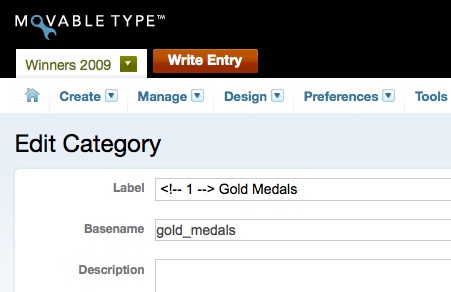
<ol>
<li>Go to the Edit Categories screen.</li>
<li>Using the &#8220;open link in new tab&#8221; option (right-click or command-click), click each category to open them in new tabs in the order that you want them in.</li>
<li>Just before the text of the label, add an html comment and place a number in the comment. Make each html comment identical to ensure sorting works properly. Because the number is in an HTML comment, it won&#8217;t be displayed on your site, but the sorting will be correct!</li>
</ol>

<p><span class="mt-enclosure mt-enclosure-image" style="display: inline;"><img alt="hack-category-order.jpg" src="http://www.beausmith.com/mt/images/hack-category-order.jpg" width="451" height="292" class="mt-image-none" style="" /></span></p>
]]>
        

    </content>
</entry>

<entry>
    <title>Set Variables in a Blog Config Template Module</title>
    <link rel="alternate" type="text/html" href="http://www.beausmith.com/mt/2009/02/set-variables-in-a-blog-config-template-module.php" />
    <id>tag:www.beausmith.com,2009:/mt//2.540</id>

    <published>2009-02-04T20:20:17Z</published>
    <updated>2009-02-04T20:24:51Z</updated>

    <summary><![CDATA[Here&#8217;s a way to set some variables for your whole blog. Create a new template module called &#8220;Blog Config&#8221; containing some code which you want set for all blog pages published by MT; for example the page layout variable: &lt;$mt:Var...]]></summary>
    <author>
        <name>Beau Smith</name>
        <uri>http://beausmith.com</uri>
    </author>
    
        <category term="Tips &amp; Tricks" scheme="http://www.sixapart.com/ns/types#category" />
    
    <category term="blog" label="blog" scheme="http://www.sixapart.com/ns/types#tag" />
    <category term="config" label="config" scheme="http://www.sixapart.com/ns/types#tag" />
    <category term="organization" label="organization" scheme="http://www.sixapart.com/ns/types#tag" />
    <category term="tip" label="tip" scheme="http://www.sixapart.com/ns/types#tag" />
    <category term="trick" label="trick" scheme="http://www.sixapart.com/ns/types#tag" />
    <category term="variables" label="variables" scheme="http://www.sixapart.com/ns/types#tag" />
    
    <content type="html" xml:lang="en" xml:base="http://www.beausmith.com/mt/">
        <![CDATA[<p>Here&#8217;s a way to set some variables for your whole blog.</p>

<p>Create a new template module called &#8220;Blog Config&#8221; containing some code which you want set for all blog pages published by MT; for example the page layout variable:</p>

<pre><code>&lt;$mt:Var name="page_layout" value="layout-wtt"$&gt;
</code></pre>

<p>Then include it at the top of every index and archive template using the following code:</p>

<pre><code>&lt;$mt:Include module="Blog Config"$&gt;
</code></pre>

<p>You can now update the page_layout in one template vs having to update it in all index and archive templates.</p>
]]>
        

    </content>
</entry>

<entry>
    <title>Publish Entries in Two Columns</title>
    <link rel="alternate" type="text/html" href="http://www.beausmith.com/mt/2009/01/publish-entries-in-two-columns.php" />
    <id>tag:www.beausmith.com,2009:/mt//2.524</id>

    <published>2009-01-26T19:24:14Z</published>
    <updated>2009-01-26T20:05:19Z</updated>

    <summary><![CDATA[Was working on a project for a major television network who needed to place the output of the &lt;mt:Entries&gt; loop into two columns. Because they wanted to have the most recent entries at the top of the columns I suggested...]]></summary>
    <author>
        <name>Beau Smith</name>
        <uri>http://beausmith.com</uri>
    </author>
    
        <category term="code" scheme="http://www.sixapart.com/ns/types#category" />
    
    <category term="asset" label="asset" scheme="http://www.sixapart.com/ns/types#tag" />
    <category term="category" label="category" scheme="http://www.sixapart.com/ns/types#tag" />
    <category term="column" label="column" scheme="http://www.sixapart.com/ns/types#tag" />
    <category term="entry" label="entry" scheme="http://www.sixapart.com/ns/types#tag" />
    <category term="loop" label="loop" scheme="http://www.sixapart.com/ns/types#tag" />
    <category term="object" label="object" scheme="http://www.sixapart.com/ns/types#tag" />
    <category term="page" label="page" scheme="http://www.sixapart.com/ns/types#tag" />
    <category term="tag" label="tag" scheme="http://www.sixapart.com/ns/types#tag" />
    <category term="tip" label="tip" scheme="http://www.sixapart.com/ns/types#tag" />
    <category term="trackback" label="trackback" scheme="http://www.sixapart.com/ns/types#tag" />
    <category term="user" label="user" scheme="http://www.sixapart.com/ns/types#tag" />
    
    <content type="html" xml:lang="en" xml:base="http://www.beausmith.com/mt/">
        <![CDATA[<p>Was working on a project for a major television network who needed to place the output of the <code>&lt;mt:Entries&gt;</code> loop into two columns. Because they wanted to have the most recent entries at the top of the columns I suggested the following.</p>

<p>Start by appending each entry into either the left or right column based upon the <em>odd</em> and <em>even</em> <a href="http://www.movabletype.org/documentation/designer/loop-meta-variables.html">template loop meta variables</a>:</p>

<pre><code>&lt;mt:Entries&gt;
    &lt;mt:If name="__odd__"&gt;
        &lt;mt:SetVarBlock name="odd_column" append="1"&gt;
            &lt;$mt:Include module="Entry Summary"$&gt;
        &lt;/mt:SetVarBlock&gt;
    &lt;/mt:If&gt;
    &lt;mt:If name="__even__"&gt;
        &lt;mt:SetVarBlock name="even_column" append="1"&gt;
            &lt;$mt:Include module="Entry Summary"$&gt;
        &lt;/mt:SetVarBlock&gt;
    &lt;/mt:If&gt;
&lt;/mt:Entries&gt;
</code></pre>

<p>Then output the two variables into your columns:</p>

<pre><code>&lt;div id="odd-column"&gt;
    &lt;$mt:Var name="odd_column"$&gt;
&lt;/div&gt;
&lt;div id="even-column"&gt;
    &lt;$mt:Var name="even_column"$&gt;
&lt;/div&gt;
</code></pre>

<p>I love simple elegant solutions.</p>

<h2>Other Object Loops in Two Columns</h2>

<p>This solution also works for other loops such as categories, comments, pages, assets, trackbacks, tags, users.</p>

<p>Here&#8217;s an example to list categories in two columns (plus the last three entries for each category).</p>

<p>Use <a href="http://www.movabletype.org/documentation/appendices/tags/setvartemplate.html">SetVarTemplate</a> to define <code>mtml</code> structure which is rendered where the template is used later:</p>

<pre><code>&lt;mt:SetVarTemplate name="category_summary"&gt;
    &lt;div&gt;
        &lt;h3&gt;&lt;a href="&lt;$mt:CategoryArchiveLink$&gt;"&gt;&lt;$mt:CategoryLabel$&gt;&lt;/a&gt;&lt;/h3&gt;
        &lt;ul&gt;
        &lt;mt:Entries lastn="3"&gt;
            &lt;li&gt;&lt;a href="&lt;$mt:EntryPermalink$&gt;"&gt;&lt;$mt:EntryTitle$&gt;&lt;/a&gt;&lt;/li&gt;
        &lt;/mt:Entries&gt;
        &lt;/ul&gt;
    &lt;/div&gt;
&lt;/mt:SetVarTemplate&gt;
</code></pre>

<p>Separate the category output into two variables;</p>

<pre><code>&lt;mt:Categories&gt;
    &lt;mt:If name="__odd__"&gt;
        &lt;mt:SetVarBlock name="odd_column" append="1"&gt;
            &lt;$mt:var name="category_summary"$&gt;
        &lt;/mt:SetVarBlock&gt;
    &lt;/mt:If&gt;
    &lt;mt:If name="__even__"&gt;
        &lt;mt:SetVarBlock name="even_column" append="1"&gt;
            &lt;$mt:var name="category_summary"$&gt;
        &lt;/mt:SetVarBlock&gt;
    &lt;/mt:If&gt;
&lt;/mt:Categories&gt;
</code></pre>

<p>Output the variables:</p>

<pre><code>&lt;div id="odd-column"&gt;
    &lt;$mt:Var name="odd_column"$&gt;
&lt;/div&gt;
&lt;div id="even-column"&gt;
    &lt;$mt:Var name="even_column"$&gt;
&lt;/div&gt;
</code></pre>

<p>If you have other examples of this, please blog them and leave a comment or just leave a comment with an example.</p>
]]>
        

    </content>
</entry>

</feed>